
The FY2027 EPC administrative window has been open since October 21, 2026, and it closes shortly before the Form 471 window opens in early 2027. After that, your entity profile locks. This article walks through what to check, what to fix, and what to do if you run out of time.
Where the FY2027 window stands
USAC opened the administrative window on Wednesday, October 21, 2026. It has not announced the closing date. USAC says only that the window closes shortly before the FY2027 Form 471 filing window opens in early 2027, and that profiles are then locked and changes cannot be made.
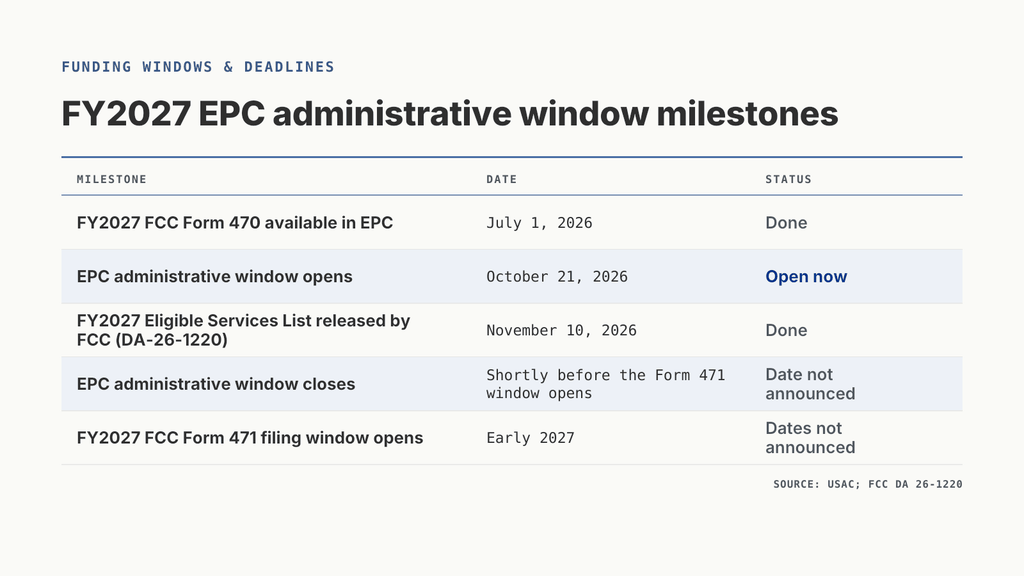
For planning, last year is the best available guide. The FY2026 administrative window closed on January 16, 2026, five days before the Form 471 window opened on January 21. Treat that date as a guide, and aim to finish well before the end of the year.
Start with access
Before you touch any data, confirm that your organization has an active EPC Account Administrator. If the person who held that role has left, you can’t manage users or update the profile until the role is filled. Call USAC’s Customer Service Center at (888) 203-8100 (Monday through Friday, 8 a.m. to 8 p.m. ET) to get it reassigned.
Two other access checks are worth five minutes:
- Sign in through One Portal. Since September 25, 2026, the blue Sign In button on usac.org sends everyone to the One Portal dashboard, and EPC is launched from there.
- If you invoice with the BEAR method, confirm that your FCC Form 498 carries your SAM.gov Unique Entity Identifier (UEI). It isn’t a profile item, but a missing UEI holds disbursements, and the same login session is a convenient time to check.
What to review in your profile
USAC uses your EPC profile to set your discount rate and your Category Two budget, so every figure below flows into funding. USAC specifically asks applicants to update student counts, and its September 2026 guidance lists these items:
- Student counts. Update enrollment for each school. This drives the Category Two budget calculation.
- National School Lunch Program (NSLP) and Community Eligibility Provision (CEP) data. Update participation figures so your discount rate reflects current numbers.
- Library square footage. Update it for any branch that has been expanded, renovated, or reduced.
- Associated entities and individuals. Confirm that every school, library, and non-instructional facility (NIF) that should be on your profile is listed, and that the contacts are current.
Two habits save time later. First, work from your own source data, not from memory. A state education agency or district student information system export is the cleanest way to tie each number to a document. Wisconsin’s Department of Public Instruction, for example, told its applicants last cycle to match lunch and enrollment data to its posted valid file. Check whether your state coordinator publishes something similar. Second, keep a dated record of what you entered and where it came from. If a number is questioned during review or an audit, that record is your answer.
Category Two: the replacement budget request
FY2027 is the second year of the FY2026–2030 Category Two budget cycle. USAC calculates a forecasted Category Two budget from your EPC profile in the first year you apply for Category Two during the cycle, so a profile that was accurate then may not be accurate now.
On October 22, 2026, USAC added an optional replacement Category Two budget request to EPC for schools and libraries, including Tribal libraries, whose student counts or library square footage have changed. If you update that data, EPC recalculates the budget and shows a popup reminding you to request the replacement.
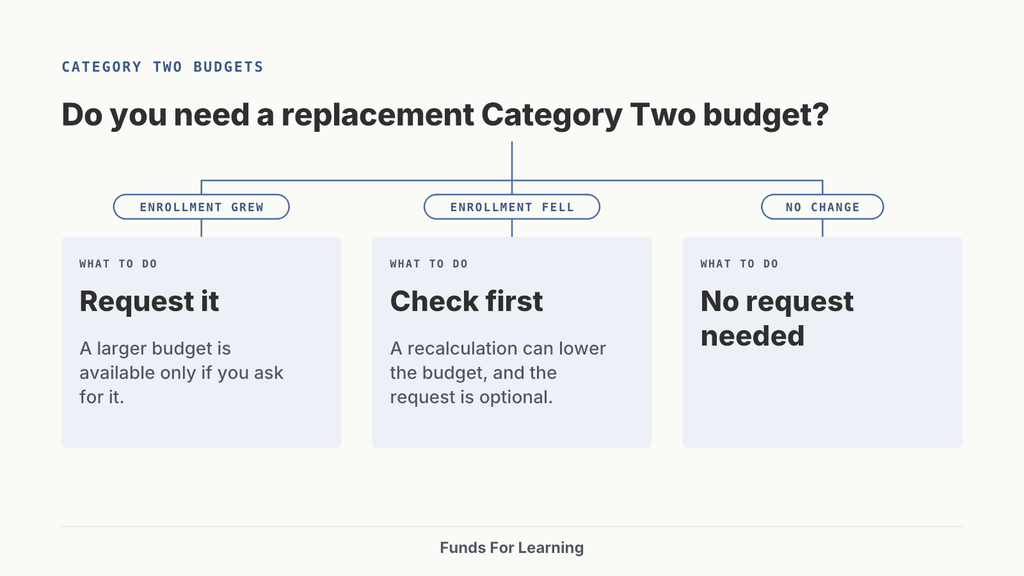
How to decide
- If your enrollment grew or your square footage increased, request the replacement. A larger budget is available only if you ask for it.
- If your enrollment fell, think before requesting. A recalculation can lower the budget, and the request is optional. Check your remaining budget and planned FY2027 projects first.
- If nothing changed materially, you don’t need to request one.
USAC’s learning module walks through the request step by step. See Module 6, “How to File a C2 Budget Replacement Request,” in USAC’s EPC Administrative Window learning module.
Adding a school, library, or NIF
You can’t add a new entity yourself. To add a school to a district, a branch to a library system, or a NIF, open a customer service case in EPC or call the Customer Service Center at (888) 203-8100. USAC’s own advice is to do this now.
The reason is timing. During the administrative window, the new entity simply lands in your profile and is available when you file your Form 471. After the window closes, the Customer Service Center can still create it, but you’ll generally need to file a Receipt Acknowledgment Letter (RAL) modification request to get it onto your application.
If the window closes first
Profile changes you miss aren’t fatal, but they cost more effort. Training guidance circulated for the previous cycle said that any profile updates not captured in the administrative window should be explained in the funding request narrative and corrected through a RAL correction after the Form 471 is certified. That adds steps after certification and leaves less room for error.
Treat the lock as a hard deadline for anything that changes a discount rate or a Category Two budget.
Pre-lock checklist
- Confirm an active EPC Account Administrator and that users can sign in through One Portal
- Pull current enrollment for every school from a district or state source
- Update student counts in EPC
- Update NSLP and CEP participation data
- Update library square footage for every branch that changed
- Review associated entities, individuals, and contacts
- Open a customer service case for any new school, library branch, or NIF
- Decide whether to request a replacement Category Two budget, and file it if so
- Save a dated record of every change and its source document
- Re-check the profile once more before USAC announces the Form 471 window dates
Not sure your profile is ready before the lock? Let’s talk. Schedule a consultation to see how Funds For Learning can help.
About the Author: Michelle Jackson is an E-rate Guide at Funds For Learning. She lives in the Oklahoma City metro with her husband, two kids, and three cats, and gardens when she is not celebrating the new Funding Year.